[CS-05] Online ordering / Jacksonville, FL
Cooking Sober
Adam cooks BBQ and Jamaican food from his home kitchen in Jacksonville and was taking orders through social media, texts and a Google Form. We built the first version of his ordering site in one day, ahead of his next Friday cook, and kept adding to it as his business grew.
[01] Where he started
Orders scattered across apps
Adam runs Cooking Sober on the side. He posts a menu for a given week, takes pickup orders, cooks, hands the food over, and clears the board for next time. Before the site, the orders came in through social media messages and texts, with a Google Form doing what it could.
He had a cook coming up on Friday, September 4, and wanted to take orders properly for it. We started on August 31.
“Starting a new cottage food business is tough, and relying on social media to juggle orders, messages, and payments quickly starts to feel overwhelming. Google Forms could only take me so far.”
Adam C., Cooking Sober
[02] Scope
Only what a weekly cook needs
A few days is enough time if you're strict about what's in and what's out. We wrote down what had to work on Friday: Adam builds and publishes a menu in a few minutes, a customer on a phone orders in under a minute and knows how to pay, Adam can see what to cook and who has paid, and he can clear the week when it's over.
We left out the rest on purpose: card payments, customer accounts, delivery and timed pickup slots. He already got paid through PayPal, Cash App and Venmo, and his customers already used them. One pickup window per menu was plenty at his volume.
- 01
Adam builds the menu
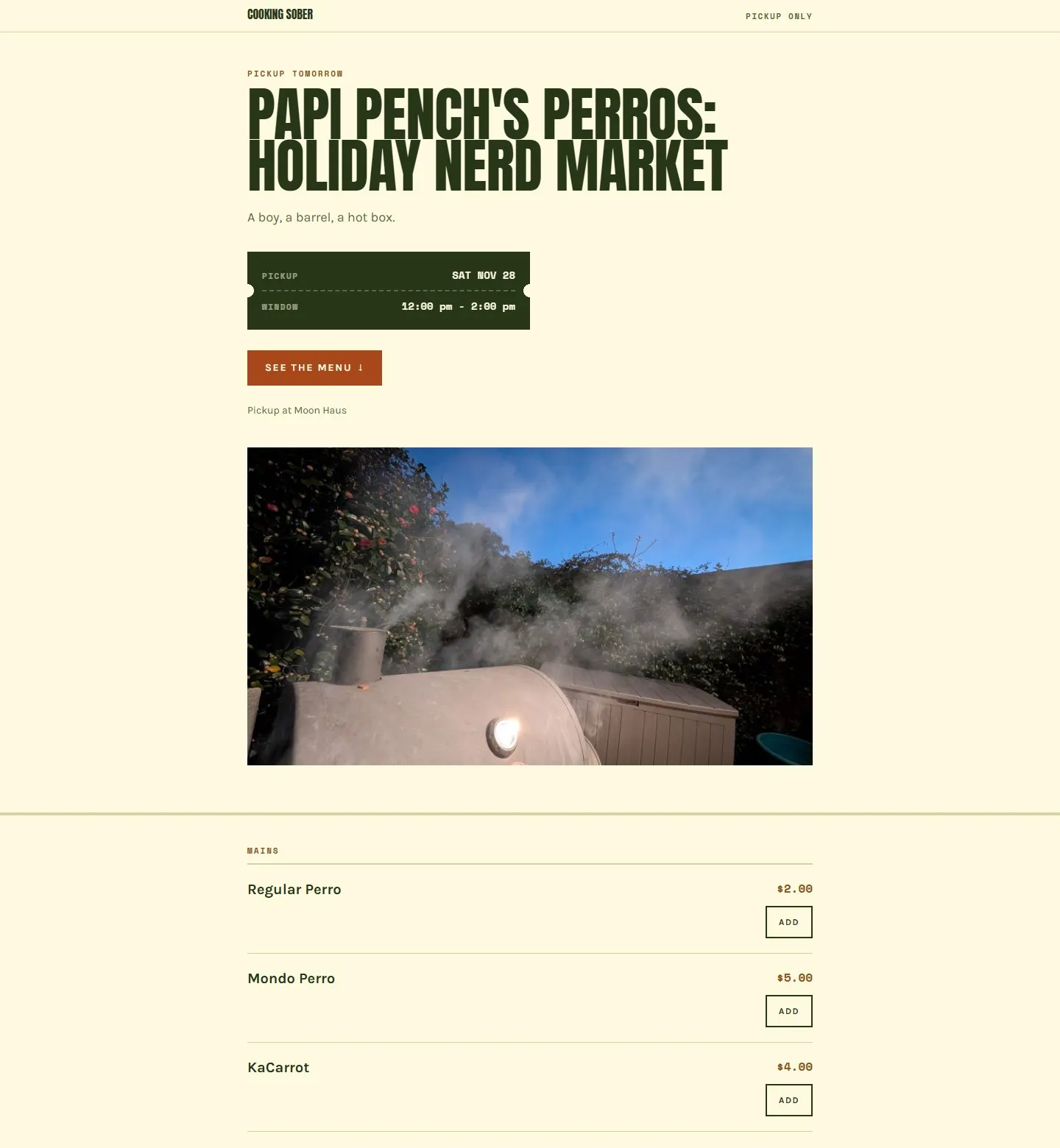
He adds dishes, prices, photos and limits, sets a pickup day and window, and publishes. Only one menu is open at a time, so customers never see last week’s food.
- 02
Customers order from their phones
They pick dishes, leave a name and number, and get their own order page with the pickup details on it. Orders open by a private link, not a short code someone could guess.
- 03
They pay the way they already do
Adam takes PayPal, Cash App and Venmo. The order page opens each app with the amount filled in, and shows his handles as plain text in case a link doesn’t open.
- 04
Adam runs the board
He sees every order, what to cook in total, and who has paid, and marks each order paid as the money comes in. After pickup day he archives the menu and starts fresh.
[03] The look
A food-shack signboard, in his colors
The design borrows from food-shack signboards and drop posters: tall poster capitals for the menu name, a typewriter face for prices and order codes, and a kitchen ticket that holds the pickup day and window.
Adam asked for hunter green, so the site ships with three color schemes he can switch between in his settings: a charred ember version, a deep forest green, and a light cream and green. Every text and button color in all three is checked against accessibility contrast rules by an automated test, so a future color tweak can't quietly make a price unreadable.
[04] After launch
Growing with the menu
The first version was done on August 31, and the work didn't stop there. In November we added the things his menus started asking for:
- Dishes that come in sizes, with add-ons, or as a bundle where the customer picks the dishes. A bundle's picks are real dishes, so they share stock with the menu.
- Smaller photos for phones, bigger tap targets, and one-tap buttons for copying a payment handle.
- Checks on every change: the full test suite and a build run automatically before anything ships.
We also found and fixed a problem that could have taken the site down after a server restart, and set up nightly off-site backups and uptime monitoring. We tested a restore from those backups to make sure they work.
[05] Walk-up mode
Ringing people up at a market table
Adam booked a stand at the Holiday Nerd Market on November 28 and 29. Online ordering assumes the customer orders ahead and picks up later. At a market table, the customer is standing right there.
So we added a walk-up screen to his admin. Adam taps the items and types a name, then hits Ring it up. The screen shows a big QR code. The customer scans it with their own phone and lands on their order with the payment buttons first. Their page checks back every few seconds and flips to “You're paid” when Adam marks it paid. Walk-up orders use the same menu and the same stock as online orders, and they show on his board with a Walk-up tag.
[06] In his words
What Adam said
“Working with Matt at SpaceTrashLabs was an incredible experience. He listened closely to my ideas and added his own smart solutions to make the ordering platform completely seamless. They built a website that instantly transformed my efficiency on both the front and back end.”
Adam C., Digestible Learning, LLC
[07] Under the hood
Project details
- Built
- Ordering site and admin panel, first version built in one day
- Stack
- React, Vite and Tailwind, with a Node and Express server and a SQLite database
- Hosting
- Docker on a Hetzner server behind Caddy, with HTTPS, nightly off-site backups and uptime monitoring
- Payments
- PayPal, Cash App and Venmo links with the amount filled in. Adam confirms payments himself.
- Testing
- 358 automated tests, run on every change
- Privacy
- His street address is never published. Customers see the pickup spot by name.
[//] Selling food, crafts or anything else?
Let's talk about yours
If you're taking orders through texts, DMs and spreadsheets, I'd like to hear how you do it now.